A while back in a company I worked for, we used to write code locally, commit it and then push it to the repo. The code was checked for the usual errors in the markdown, structure and so on using a BitBucket pipeline and if there were any issues, the build would fail and you would adjust the code locally, re-commit and re-push.
So far so good.
The problem was that the checks were only done when you pushed the code. This meant that you could spend a lot of time writing code, only to find out that there was an issue with the code when you pushed it. This was a waste of time and could have been avoided. But how?
Enter pre-commit.
Pre-commit is an open source tool that allows you to run checks on your code before you commit it. This means catching issues on commit and before push, saving a lot of time and effort. Here’s how.
Installation
Assuming you have Python installed, just use pip to install it..
python3 -m pip install pre-commit
Configuration
Create a .pre-commit-config.yaml file in the root of your project and add the following:
repos:
-   repo: https://github.com/pre-commit/pre-commit-hooks
    rev: v4.6.0
    hooks:
    -   id: check-added-large-files
    -   id: check-merge-conflict
    -   id: end-of-file-fixer
    -   id: trailing-whitespace
    -   id: mixed-line-ending
    -   id: check-json
    -   id: check-yaml
    -   id: detect-private-key
    -   id: pretty-format-json
        args: [--autofix]
    - id: markdown-spellcheck
        args: [--ignore-numbers, --check-filenames, --check-hidden, --check-acronyms, --check-case, --check-urls]
        files: '\.md$'
The above is what I use to check my markdown files for Hugo, however you can add more repos with pre-commit-hooks and add their hooks to your configuration so you could check Python scripts or whatever you like.
OK, now install the hooks:
pre-commit install
.. and that’s it. Now when you commit your code, the checks will run and if there are any issues, you will be prompted to fix them before the commit is made. As seen below, this is what it looks like in VSCode:
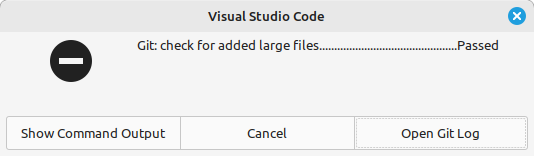
Not super informative, but, if you click “Show Command Output” you will see the errors, which you can then fix.
The Master Stroke
The real beauty in this approach is that everyone gets the same coding standard and can install the hooks on their local machine and pre-check the code before they commit.
However, the master stroke is to add the hooks to your CI/CD pipeline. In Github Actions, for example, it’s merely a case of adding the following to your workflow:
jobs:
  build:
    name: Build and deploy
    # was runs-on: self-hosted
    runs-on: ubuntu-latest
    steps:
      - name: Checkout the repository
        uses: actions/checkout@v3
        with:
          submodules: true # Fetch Hugo themes (true OR recursive)
          fetch-depth: 0 # Fetch all history for .GitInfo and .Lastmod

      - name: Run the pre-commit checks
        uses: pre-commit/action@v3.0.1

etc..
You don’t even have to tell it where the .pre-commit-config.yaml file is, it will find it and run the checks, so everyone gets the same checks on their code, including the CI/CD pipeline.
Conclusion
pre-commit is a fantastic tool that can save you a lot of time and effort by catching issues before you commit your code. It’s easy to install and configure and can be used by everyone in your team. It’s a no-brainer to use it and I highly recommend it.